
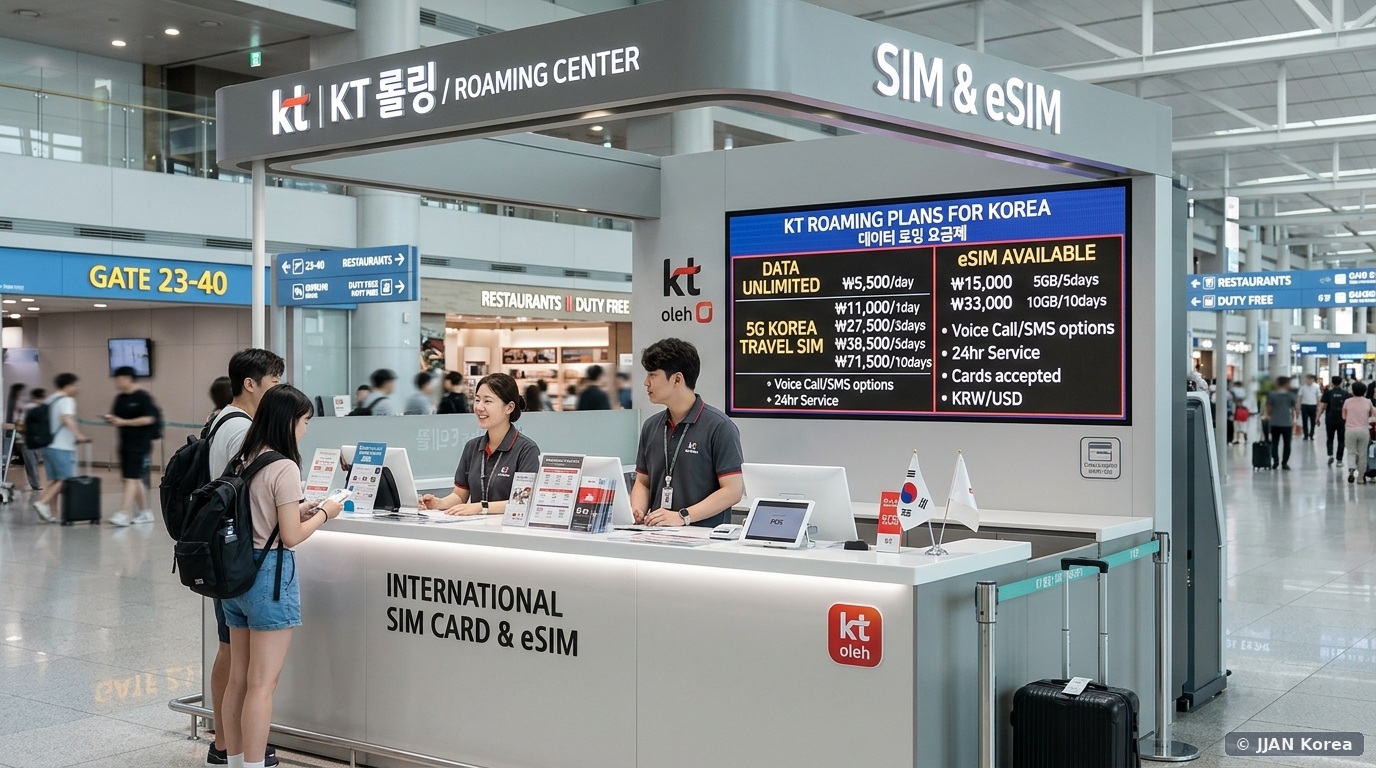

Stepping off a long-haul intercontinental flight onto the pristine polished concourses of Incheon International Airport (ICN), your very first logistical priority before navigating baggage claim or currency exchange is securing an immediate, high-speed mobile data connection. In South Korea—where hyper-connected life is powered by ubiquitous 5G infrastructure, KakaoTalk messaging, automated Catch Table dining queues, and localized digital mapping on Naver Map—traveling without reliable cellular data creates instant, paralyzing friction.
However, arriving travelers face a confusing marketplace of competing options: digital eSIM profiles, traditional physical prepaid SIM cards, and portable Pocket Wi-Fi routers (Eggs) offered by Korea’s major telecom triumvirate—KT (Korea Telecom), SK Telecom (SKT), and LG U+—alongside international third-party roaming aggregators. This comprehensive, field-tested guide compares data throughput speeds, incoming voice call allowances (+82 010 numbers), airport arrival pickup kiosks, and carrier-lock prerequisites to ensure seamless connectivity in 2026.
1. eSIM vs. Physical SIM vs. Pocket Wi-Fi: Detailed Comparison
Before purchasing a connectivity package at the airport, evaluate your specific device hardware and travel group dynamics:
| Parameter | Digital Travel eSIM | Physical Prepaid SIM Card | Portable Pocket Wi-Fi (Egg) |
|---|---|---|---|
| Hardware Requirement | Unlocked eSIM-compatible smartphone (iPhone XS+, Pixel 4+, Galaxy S20+) | Any unlocked smartphone with a physical nano-SIM tray | Any Wi-Fi enabled device (laptops, tablets, locked phones) |
| Average Pricing (5-Day Unlimited) | ₩16,500 – ₩22,000 | ₩27,500 – ₩33,000 | ₩16,500 – ₩22,000 (₩3,300 – ₩4,400/day) |
| Local Korean Voice Number (+82 010) | Data-only (Select packages offer incoming voice/SMS) | Full local 010 number included (Free incoming calls/SMS) | No voice number (Data hotspot only) |
| Activation & Delivery | Instant email QR code scan; no airport counter visit | Physical counter pickup at Incheon Airport Terminal 1 or 2 | Counter pickup & return; credit card security deposit required |
| Multiple Device Sharing | Personal hotspot supported (subject to daily tethering caps) | Personal hotspot supported on phone | Up to 5 devices connected simultaneously |
| Best Suited For | Tech-savvy solo travelers and dual-SIM smartphone users | Foodies wanting restaurant table reservation kiosks (Catch Table) | Families, business colleagues traveling with laptops |
2. The Crucial Local Phone Number Catch: Why Foodies Need a Physical SIM
While digital travel eSIMs are cheaper and eliminate counter queues, they feature one massive operational disadvantage for tourists exploring Seoul’s vibrant culinary culture: the absence of an authentic domestic Korean mobile phone number (+82 010-XXXX-XXXX).
Popular Korean restaurants, viral cafes (like London Bagel Museum), and trendy Seongsu pop-ups enforce digital waiting queue stands (Catch Table or NowWaiting) stationed at their front entrance. Most automated door kiosks require an 11-digit domestic Korean phone number to push queue notifications via KakaoTalk or SMS. If you purchase a data-only eSIM lacking incoming SMS/voice reception, you will face awkward communication barriers attempting to register for walk-in dining tables. A physical prepaid tourist SIM card from KT or SK Telecom comes equipped with a real 010 number that receives incoming calls and SMS completely free of charge. For transit out of the airport, check our Incheon Airport to Seoul transit comparison.
3. The Non-Negotiable Prerequisite: Carrier Lock Status
Before purchasing any Korean SIM card or scanning an eSIM QR code, you must confirm that your smartphone is 100% Carrier-Unlocked by your domestic service provider at home (e.g., AT&T, Verizon, T-Mobile, Rogers, EE, Vodafone). If your device is locked under a domestic carrier installment contract, your device will reject Korean telecom profiles, triggering an “Unsupported SIM / Activation Error” upon landing.
How to Check Carrier Lock Status in Under 30 Seconds
- On iPhone (iOS): Go to
Settings > General > About. Scroll down toCarrier Lock. If it displays “No SIM restrictions”, your handset is fully unlocked and ready. If it displays “SIM locked”, contact your domestic carrier to request an international unlock prior to departure. - On Android (Samsung / Google Pixel): Go to
Settings > Connections > Mobile Networks > Network Operators. If multiple carrier search options appear or your carrier settings display unlocked status, your device is compatible.
4. Incheon Airport 24-Hour Telecom Counter Locations & Pickup Protocols
If you pre-ordered a physical SIM or Pocket Wi-Fi router online, or wish to purchase one upon arrival, head to the designated carrier counters located across the 1F public arrivals lobby:
Terminal 1 Operating Counters
- KT (Korea Telecom): Located between Exit 6 and Exit 7 (24 Hours) and between Exit 10 and Exit 11 (6:00 AM – 10:00 PM).
- SK Telecom (SKT): Located between Exit 5 and Exit 6 (24 Hours) and between Exit 9 and Exit 10 (6:00 AM – 10:00 PM).
- LG U+: Located between Exit 11 and Exit 12 (24 Hours).
Terminal 2 Operating Counters
- KT Roaming Center: Located directly opposite Exit 2 and Exit 3 on Level 1 (24 Hours).
- SK Telecom Roaming Center: Located between Exit 4 and Exit 5 on Level 1 (24 Hours).
- LG U+ Counter: Located between Exit 4 and Exit 5 on Level 1 (6:00 AM – 10:00 PM).
Required Identification: Present your physical Passport and your booking confirmation barcode. The telecom representative will swap your SIM card, configure your cellular APN (Access Point Name) settings, verify that 5G/LTE data flows smoothly, and test incoming voice reception before you step away from the desk.
5. Step-by-Step Digital eSIM Activation Walkthrough
If you opted for a digital travel eSIM, follow this zero-touch installation sequence while connected to Incheon Airport’s complimentary high-speed Wi-Fi:
AirportWifi_Free inside the terminal concourse.Settings > Cellular > Add eSIM > Use QR Code. Scan the QR code.6. Frequently Asked Questions (FAQ)
Can I top up extra days if I decide to extend my vacation in South Korea?
Yes. Prepaid SIM cards purchased from major providers (KT and SK Telecom) allow online extensions via their official mobile websites. Enter your 010 telephone number and passport number to purchase additional 3, 5, 10, or 30-day blocks with an international credit card without replacing your physical SIM.
Does South Korea throttle unlimited data packages?
Most “Unlimited” tourist data packages provide an unthrottled allocation of high-speed 5G/LTE data per calendar day (typically 3GB to 5GB). If you exceed this threshold within 24 hours, data speeds are temporarily throttled to 5 Mbps (which remains plenty fast for Google Maps, KakaoMap, YouTube 720p streaming, and messaging) until resetting at midnight.
Can an international student convert a prepaid tourist SIM into an ARC-registered postpaid plan?
No. Tourist prepaid SIM cards registered with a foreign passport are temporary lines that automatically expire once the tourist window closes. Once you receive your physical Alien Registration Card (ARC), visit an authorized telecom agency shop (대리점) to open a formal postpaid contract registered under your official Foreigner Registration Number, which unlocks carrier identity verification (PASS). For ARC issuance, consult our Alien Registration Card (ARC) complete guide.
What should I do if my pocket Wi-Fi router runs out of battery during a day trip?
Pocket Wi-Fi devices feature an average battery life of 8 to 11 hours. Always pack an external USB power bank in your daypack. If your device dies, subway stations, major cafes (Starbucks, Twosome Place), and convenience stores provide free public Wi-Fi or charging outlets.
🛡️ JJAN Korea Editorial Standards & Fact-Checking Verification
This article was independently researched, field-tested, and audited by the JJAN Korea Digital Infrastructure & Telecommunications Desk in Seoul. Our tech team tested physical SIM activations and eSIM QR profiles across Incheon Airport Terminal 1 & 2 arrival booths for KT, SKT, and LG U+.
Notice an unlisted policy change, fare update, or revised administrative rule? Help us keep our international community accurately informed: Submit a Correction to our Seoul Newsroom.